WordPress or Custom Development?
The Complete 2026 Guide to Choosing Right
A client called me last month: "I need a new website. I spoke to three different companies — one offered WordPress for $2,500, the second offered custom development for $7,000, and the third didn't really explain what they were proposing. I have no idea what to choose."
This is the most common scenario we encounter. And it's the biggest confusion: both solutions are valid, but each has situations where it's the right choice and others where it's an expensive mistake.
In this article I'll explain the differences with full honesty — without pushing you in any direction. After you finish reading, you'll know exactly which solution suits your business.
What is WordPress, really?
WordPress is a Content Management System (CMS). Today, 43% of all websites on the internet run on WordPress — including BBC America, TechCrunch, Sony Music, and Microsoft News.
How does it work? You have:
- Core — the basic system code
- Theme — the design and layout
- Plugins — additional functionality (over 60,000 plugins available)
- Admin panel — an interface that lets you edit the site yourself
Think of it like building a house with LEGO blocks — pick rooms, colors, furniture, and you have a ready house.
The clear advantages
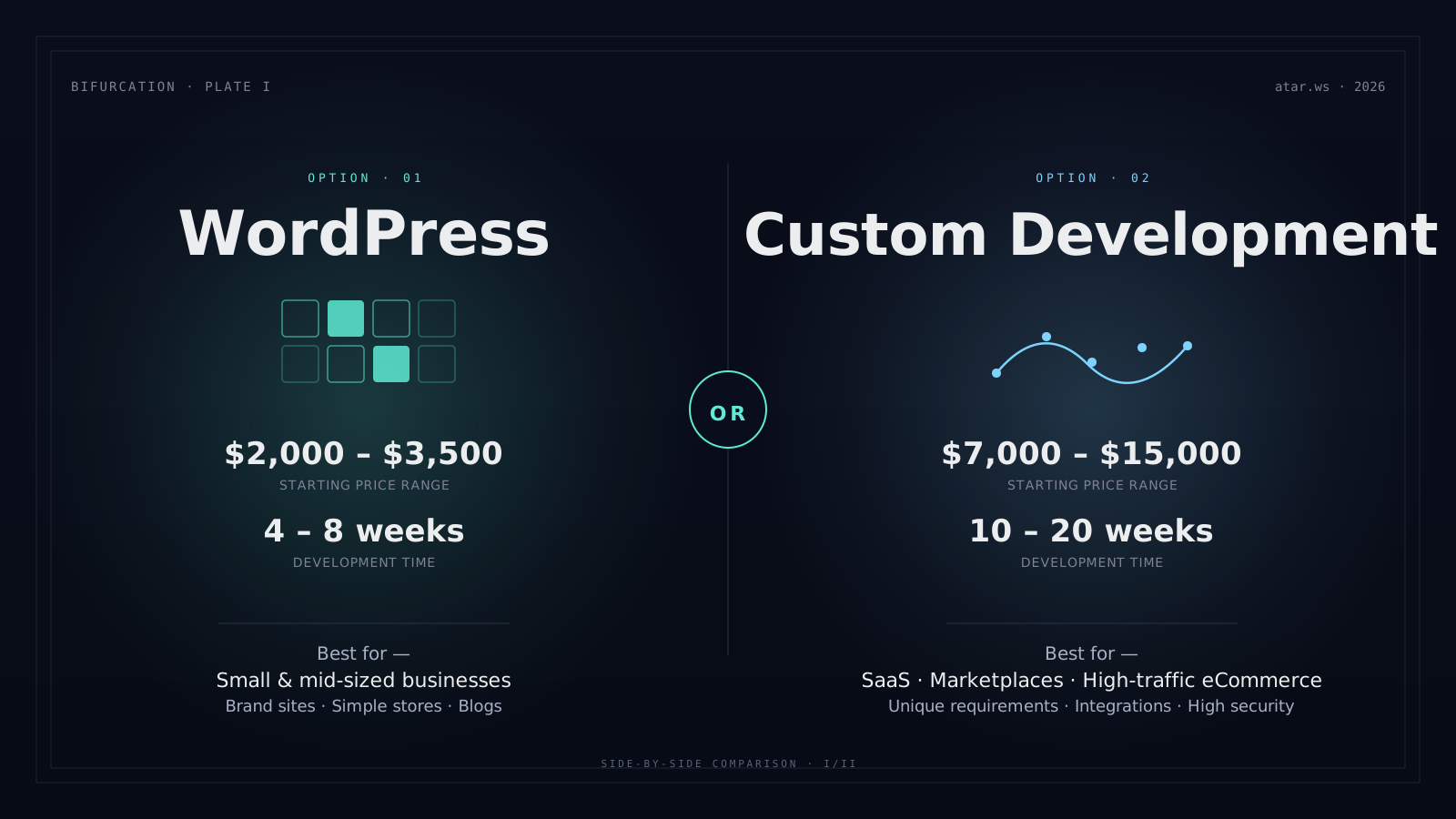
- Relatively cheap — $2,000–$3,500 for a basic brand site
- Fast to develop — 4–8 weeks from discovery to launch
- Easy to edit yourself — after an hour of training, you can change content yourself
- Massive community — any problem you encounter, someone has already solved
- Cheap maintenance — $75–$200/month
The disadvantages no one tells you
- Plugin conflicts — statistically, 70% of WordPress site issues are plugin-related
- Security requires attention — WordPress is the #1 hacker target (because it's the most popular)
- Speed can drop — a site with 30 plugins will be slow regardless of code quality
- Limited flexibility — once you want something truly unique, you hit template boundaries
- Plugin maintainer dependency — if a plugin stops updating, you might be stuck
"WordPress was built on the idea that ideas belong to everyone, and code is shared so that anyone, anywhere, can use it."
— Matt Mullenweg, founder of WordPress
That's exactly the strength and the weakness of WordPress — the tools are available to everyone, but the responsibility for long-term maintenance falls on everyone too. If there's no one to maintain it, the site will fall apart within 18 months on average.
What is "custom development"?
Custom development means: building the site from scratch, with code written specifically for you, using a modern stack like React, Next.js, or Vue.
Think of it like a custom architect-designed house — everything planned exactly for your needs, but it takes more time, costs more, and requires someone who knows how to work with it.
The advantages
- Maximum performance — site loads in 1.5 seconds instead of 3–5. Google loves it.
- 100% flexibility — every feature you imagined can be built
- Completely unique design — won't look like any other site
- High security — smaller attack surface
- Easy to scale — if business grows 10x, the site keeps performing
- Clean code you own — not dependent on one company
The disadvantages
- More expensive — $7,000–$25,000 for a medium project
- Takes longer — 10–20 weeks
- Hard to self-edit — you'll need a developer for any significant change
- Maintenance requires expertise — not every developer can continue the work
- Risk if the agency disappears — must ensure full code ownership
The direct comparison
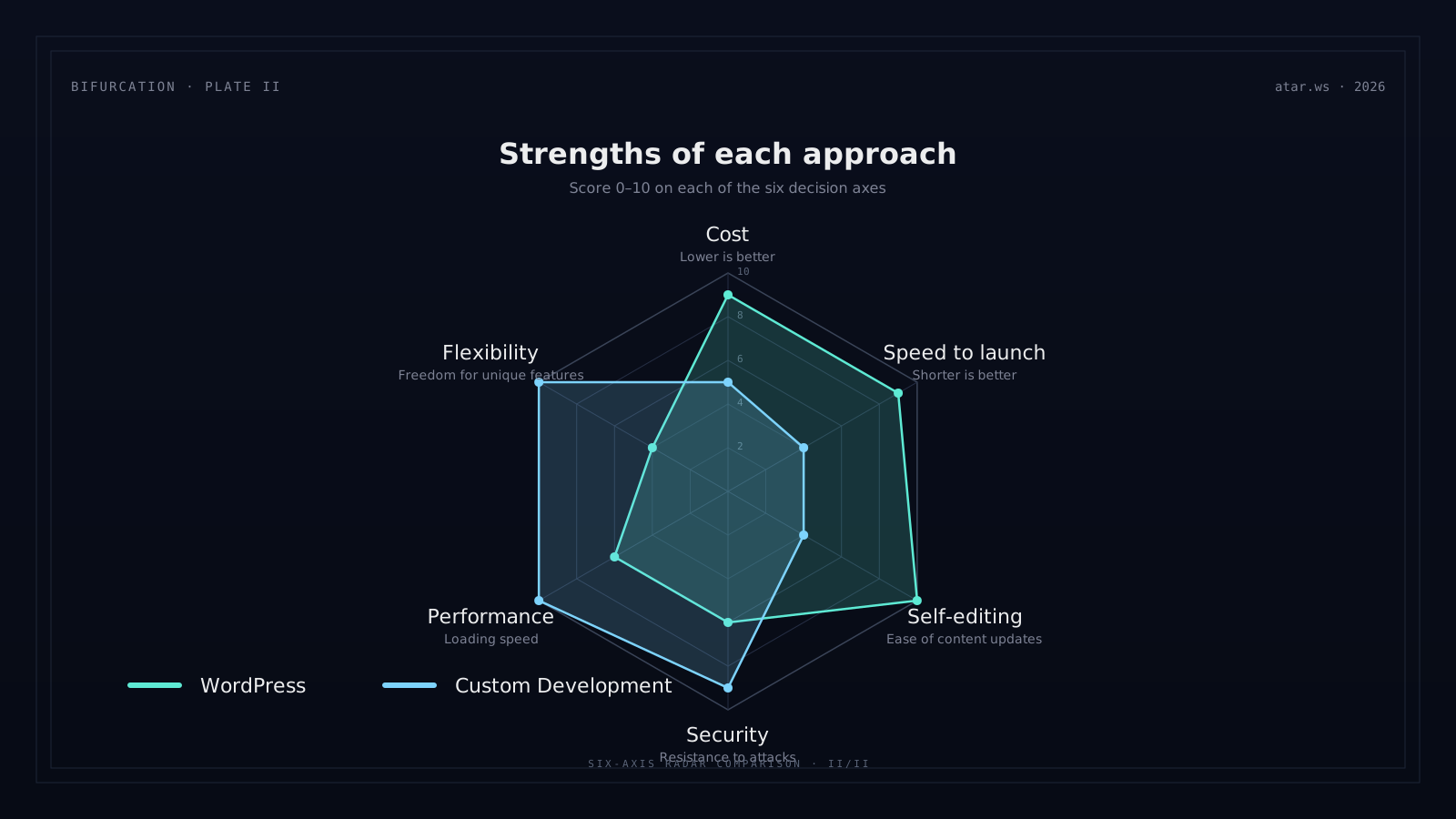
| Parameter | WordPress | Custom Development |
|---|---|---|
| Starting price | $2,000–$3,500 | $7,000–$15,000 |
| Development time | 4–8 weeks | 10–20 weeks |
| Loading speed | 2–4 seconds | 0.8–1.5 seconds |
| Flexibility | Medium | Maximum |
| Self-editing | Very easy | Depends on build |
| Monthly maintenance | $75–$200 | $200–$750 |
| Security | Requires attention | High by nature |
| Scalability | Medium | Excellent |
"The choice doesn't matter as much as the people you work with. WordPress built by a professional agency will be better than custom development by an amateur."
When to choose WordPress?
Go with WordPress if:
- You own a small/medium business (5–50 employees)
- You need a brand site, business site, or simple store
- You want to edit content yourself
- Budget is limited (under $7,500)
- Time is critical (launch within 2 months)
- Your needs are standard
Real-world examples: A lawyer with service pages and contact form · A boutique owner with 100 products · A private lecturer · A consulting firm with a weekly blog · A restaurant with online menu
When to choose custom development?
Go with custom development if:
- Unique functional requirements (internal CRM, complex calculations, dashboard)
- You're building a SaaS or marketplace
- Performance is critical (eCommerce with hundreds of thousands of monthly visitors)
- Complex integrations (CRM, ERP, external systems)
- Design must be exclusive (premium brands)
- High-level security necessary (finance, healthcare, government)
Real-world examples: A SaaS startup for inventory management · A car rental company with real-time availability · A premium brand · A matchmaking platform · An academic management system
3 short case studies — what I've seen in the field
WordPress + Elementor → collapsed after 2 years
Site built in 2023 for $2,500. Two years later: 23 plugins, contrast broken after an update, 5.4s LCP, 38% drop in leads. Rebuilding on clean WordPress in 2025 cost $4,000 — more than the original site.
WooCommerce with WP-Rocket — wasn't enough
Online store handling ~60 orders/day. At peak hours the site froze, payment processing failed, customers complained. Moving to a Next.js + Stripe build on Vercel cost $13,000. Result: zero downtime over 12 months, conversion lifted 27%.
Custom from day one — the right call
Requirements included a complex dashboard, multi-tenancy, and a public API for clients. WordPress wasn't an option. We built React + Node + PostgreSQL for $30,000. The company raised a Series A within a year and scaled up without major refactor.
In all three cases — the right tool wasn't the cheaper one, it was the one that fit the real requirements. WordPress is good for some cases. For others, it's more expensive in the long run.
5 questions to ask before deciding
Before you make a decision, honestly answer these:
01 — How unique is my site really?
Requirements similar to 1,000 other businesses in your field → WordPress. Truly unique → custom.
02 — What's my maintenance budget for 3 years?
Custom development is cheaper long-term if you want frequent updates. WordPress is cheaper if changes are few.
03 — How much do I trust the supplier?
Custom development creates more dependency. Ensure you receive all code and documentation.
04 — How important is the site to my business?
If the site is your main channel — economize less upfront. Performance = more conversions.
05 — What are my internal capabilities?
Have an IT team? Marketing team that understands sites? If yes — custom development is open. If not — WordPress.
A third way: WordPress Headless + Custom Frontend
In 2026 there's a hybrid approach becoming popular: WordPress runs in the backend (for content management) + custom frontend in Next.js or React.
This gives the best of both worlds:
- Easy self-editing
- Excellent performance
- High flexibility
- Mid-tier cost ($4,500–$9,000)
Suits businesses that outgrew regular WordPress but don't want to jump to full custom development.
WordPress and custom development in the AI era — what changed in 2026
You can't talk about "WordPress or custom" without mentioning AI. The two worlds advanced at very different speeds:
WordPress with AI: plugins like AI Engine, Bertha AI, and Divi AI let you generate content and design from prompts. But — they run as a layer on top of WordPress, adding another dependency, monthly fees, and the risk that "the plugin shuts down in 2027".
Custom with AI: tools like Lovable, V0, and Bolt generate Next.js/React code from a text description. The output almost always needs significant refactoring, but it cuts 40-60% off development time. The savings are real.
What this means for your choice in 2026: if the main reason you picked WordPress in the past was "because custom is too expensive" — that reason no longer holds. With AI, custom development is 30-40% cheaper than it was in 2023. The question shifted from "how much does it cost?" to "what do you need long-term?".
In parallel — if you do pick WordPress in 2026, AI-search optimization (GEO) requires a content structure that standard WordPress plugins don't support well yet. Adjustments are required.
The truth no one tells you
The big secret: the choice doesn't matter as much as the people you work with.
WordPress built by a professional agency will be better than custom development by an amateur. And vice versa — custom development by a professional company will bring higher results.
What matters: choose a solution that suits your business, not your ego. Many clients ask for custom development because "it sounds professional" — and that's an expensive mistake.
The summary
Start with WordPress unless there's a specific, clear reason for custom development. If in a year or two you want to upgrade to custom — you can. The reverse migration is significantly harder.